Are Third-Party Fingerprint Animation Apps Still Safe?
Learn whether third-party fingerprint animation apps are safe, how cosmetic effects differ from real biometric security, and which permissions are warning signs.
 Nontuff Editorial8 min read · Updated September 2026
Honestly? Mostly yes—but not blindly. Third-party fingerprint animation apps can be safe when they are transparent about being cosmetic and request only permissions that make sense. Your phone's built-in animation remains the cleaner and safer first choice.
What the fingerprint animation actually does
You know the little glowing ring or fingerprint icon that appears when you unlock your phone? It is not there only to look good. It is the phone's visual way of saying that the sensor is reading your finger and showing where you should place it.
Phones with in-display sensors place the reader under the screen instead of using a separate physical button. Some phones use optical sensors, which illuminate and capture an image of the fingerprint. Others use ultrasonic sensors, which use sound waves to map the finger and may work better when a finger is slightly damp.
The broad process is straightforward: you touch the sensor area, the animation appears, the sensor captures biometric information, and the secure biometric system compares it with the fingerprint enrolled on the device. The animation itself performs no security work. Think of it as a visual status indicator while the real authentication happens separately.
Your phone may already include fingerprint animations
Before installing another app, look for the option built into your phone. On many Xiaomi, MIUI and HyperOS devices, open Settings → Fingerprints, face data, and screen lock → Fingerprint unlock → Fingerprint animation. Choose one of the available styles and it should apply immediately.
Other manufacturers may place a similar control under Security, Lock screen, Biometrics or Personalization. Names and menu paths vary between models and software versions.
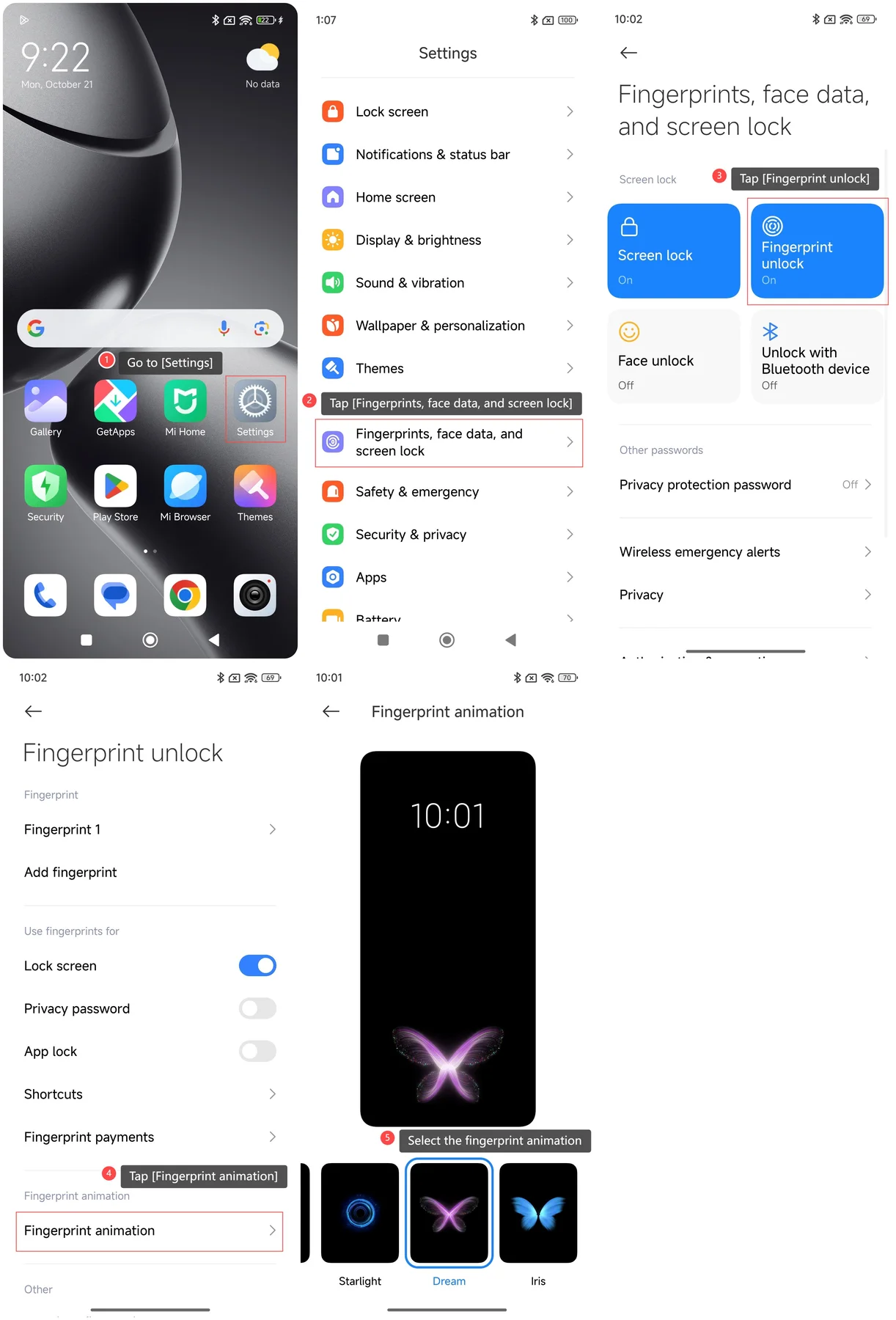 01 Full view
Are third-party fingerprint animation apps safe?
If your phone does not include customization—or you want a different visual style—third-party apps can provide animated fingerprint wallpapers or screen overlays. These can look convincing, but they do not control your real biometric sensor or replace Android's authentication.
The trustworthy listings explain that their effects are cosmetic. Your enrolled fingerprint and the decision to unlock the device remain with Android and the phone's biometric hardware, separate from the animation app.
That means the animation itself is usually not the main concern. The more important questions are who published the app, what information it collects, and whether its permissions are reasonable for a cosmetic effect.
Fingerprint animation apps you may encounter
These Play Store listings illustrate the type of cosmetic fingerprint-animation app available. Availability, permissions, ratings and data-safety disclosures can change, so review the current listing before installing.
InScreen fingerprint animation
Offers fingerprint-style animated wallpapers and states that it does not provide real fingerprint authentication.
Review on Google PlayIn Display Fingerprint
Provides animated fingerprint styles and live wallpapers. Carefully review its current permissions before installation.
Review on Google Play3D Fingerprint Lock · Animation
Creates cosmetic 3D-style scanning effects. It does not turn the screen into a real fingerprint reader.
Review on Google PlayPermissions that deserve extra attention
A simple visual effect should not need broad control over your phone. Treat an unexplained request for any of the following as a reason to pause and investigate:
Before installing, inspect the Play Store's Data safety section, the current permissions, recent user reviews and the developer's other apps. Data safety information is provided by the developer, so it should be considered alongside the actual permission prompts and the app's behaviour.
Should you install one?
Most fingerprint animation apps can be fine when they clearly describe themselves as cosmetic and request only permissions required for the visual effect. Skip any app that makes misleading biometric-security claims, hides its purpose, or asks for powerful permissions without a convincing explanation.
If your phone already includes fingerprint-animation choices, use those first. The native option is cleaner, safer, advertisement-free and genuinely connected to the phone's fingerprint interface instead of merely creating the appearance of a scan.
Editorial note: App availability, permissions and Play Store disclosures can change. This guide was reviewed in September 2026. Always inspect the current listing and permission prompts on your own device.